In any conversation about modernizing multifamily operations, the move-in and move-out process is the moment everyone agrees needs work. It is the most operationally heavy event in the resident lifecycle and the most financially significant. Every move-in is a revenue moment, every move-out is a turn-cost and skip-risk moment, and the spread between the two is what separates portfolios that hit pro forma from portfolios that miss.
In 2026, the typical move-in and move-out process at a 10,000+ unit operator still relies on a clipboard, a Google Doc, and four different vendor websites that residents are expected to visit themselves.
This guide is for property managers, asset managers, and ownership groups looking to automate this work. We walk through what automation means here, the five workflows worth automating first, how to think about integrating with your PMS, and what to look for when evaluating vendors. The wrong tool will fail to deliver and cement inefficiency for years.
What “automating the move-in and move-out process” actually means
There is a version of move automation that is just a digital checklist with reminder emails. This guide does not cover that version.
Real move-in and move-out automation does three things at once:
1. Orchestrates resident-facing tasks. Every step a resident needs to complete, from notice to move-in (or move-out), runs through a single platform with a coherent flow, replacing seven disconnected emails and login screens.
2. Activates services. Movers, packing, storage, utilities, internet, and renters insurance are all set up through the platform, with vetted partners and verified compliance.
3. Closes the loop with the property. Staff can see in real time which residents are on track, which are stuck, what has been verified, and what has not. The information lives in one place rather than scattered across five inboxes.
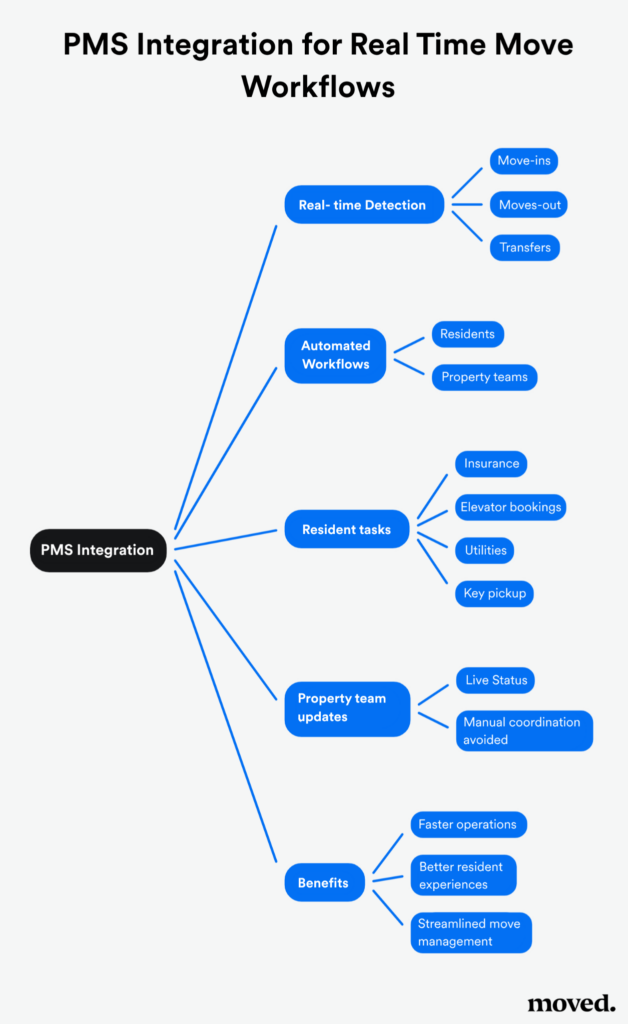
A move infrastructure platform integrates alongside the property management system rather than living inside it. The PMS continues to handle leasing, accounting, and the system of record. The move infrastructure platform handles the resident experience and the service activation, with data flowing between the two via API.
A basic checklist tool and a move infrastructure platform are as different as a dispatch radio and a rideshare app—both move people. Only one is infrastructure.
For context on why this matters from a revenue angle, see our piece on ancillary revenue in multifamily.
The hidden costs of running move-in and move-out manually
Most operators running a manual move-in and move-out process underestimate the cost. The visible cost is staff time. The invisible costs surface on the NOI line a quarter later.
Vacancy days. When a resident’s move-out timeline drifts (extension requests, dragged keys, late inspection), the unit is not ready for the next resident on time. Every day adds roughly 1/30th of a month’s rent in lost income.
Skip-and-eviction risk. Residents who fall through the cracks at move-in (insurance never verified, the first 30 days rocky, payment setup unclear) are disproportionately likely to become collection problems six or twelve months later.
Insurance and liability exposure. Unverified renters insurance is a quiet but serious risk. When a resident-caused fire damages adjacent units and the resident has no policy in force, the property is liable for the damages. Most lease language requires insurance; most properties lack a system to verify it.
Lost ancillary revenue. Movers, packing, storage, utility activation, and internet. Every service activated outside the property’s ecosystem is treated as partnership income and leaves the portfolio. For more on the math, see our companion piece on increasing multifamily NOI without raising rent.
Resident churn. First impressions matter, and the move-in experience is the longest single first impression a resident has. A clunky, paperwork-heavy move-in colors the entire lease.
For a 10,000-unit portfolio turning over half its units per year, the combined cost typically runs $5M to $13M in annual NOI drag. That is the size of the problem.
Five workflows that should be automated first
Not every part of the move-in and move-out process needs the same treatment, and some workflows return the investment faster than others. Here is the order we usually recommend.
1. Resident task orchestration
This is the foundation. From the moment a resident signs (or gives notice), they have 15 to 30 distinct tasks to complete: deposit payment, lease acknowledgment, parking selection, key pickup logistics, utility setup, insurance, address changes, mail forwarding, mover booking, packing services, move-day logistics, and post-move-in walkthrough.
Automating this means consolidating those tasks into a single resident-facing flow with clear deadlines, automated reminders, and visibility for the property team. The output is an actual orchestrated workflow, not a PDF checklist.
The right platform shows the resident what is done, what is next, and what they need to act on this week. The property staff sees the same dashboard as the operator.
2. Insurance verification and compliance
Few workflows cleanly converge revenue and risk the way insurance verification does. Renters insurance is required by most leases, partners well with multiple revenue lines for the property, and protects the asset from resident-caused losses. Most properties do not have a system to verify that the policy is in force at move-in, let alone throughout the lease.
Automation here means:
- Required insurance upload at move-in
- Real-time policy verification (carrier, coverage amount, effective dates)
- Automated re-verification when policies lapse
- Integrated insurance partnership for residents who do not have a policy
- Done well, this turns a compliance and risk concern into an income line while reducing exposure.
3. Service activation (movers, utilities, internet)
This is the highest-margin revenue automation. Instead of letting residents book movers on Yelp, set up power on the utility’s clunky portal, and shop online on Google, every service is activated through the platform with vetted partners.
The benefits stack:
- Residents get a curated, faster experience
- The property earns partnership revenue from each transaction
- The mover network is insured and known to the property
- The property avoids the elevator damage and hallway claims that come with random, unvetted movers
Movers, packing, and storage are usually the first three services a resident wants activated, since these are the highest-intent decisions made during the move-in and move-out window.
4. Communications cadence
Most properties send the same emails at the wrong times. The good ones send the right communication at the right step. The best ones send it through the platform the resident is already using, so the message and the action live in the same place.
Automated communications cadence includes:
- Welcome and orientation in the days before move-in
- Service-specific reminders timed to each task’s deadline
- Move-day logistics and key pickup details
- Post-move-in check-in (which doubles as a satisfaction signal for retention)
- Move-out notice acknowledgment, inspection scheduling, and deposit reconciliation cadence
The goal is fewer, better-timed in-flow communications, not more email.
5. Move-out inspection and deposit reconciliation
Move-out is where most properties leak the most NOI, and the workflow is almost always the most manual. Automating this means:
- Self-scheduled pre-vacation inspections via the platform
- Digital damage documentation (photos, notes, timestamps) tied to the unit and resident
- Automated deposit reconciliation routed back to the PMS
- Coordinated handoff to the maintenance team for the turn
This compresses turnaround time and dramatically reduces disputes that eat up staff hours and erode resident reviews.
The integration question: how does this work with your PMS
The most common question we get from asset managers and IT is: how does this work with our PMS?
The honest answer is that move-in and move-out automation should not live inside the PMS. PMS platforms are systems of record for leasing, accounting, the rent roll, and compliance reporting. They were not built to serve as the resident-facing experience layer for a 30-day move-in flow that includes mover bookings, insurance verification, and utility activation.
A move infrastructure platform integrates alongside the PMS via API. Resident records flow from the PMS into the platform. Activity, completions, and verifications flow back. The property team has visibility in both systems, and the resident has a single experience that does not require them to know the PMS exists.
Major PMS platforms (Yardi Voyager, Yardi Breeze, RealPage OneSite, Entrata, AppFolio, ResMan) all support this pattern through documented APIs. The integration work is real but bounded, typically measured in weeks rather than months for the platform implementation.
For a deeper look at the resident-side experience this enables, see the Moved residents experience and our ultimate guide to resident onboarding automation for a longer-form companion piece.
Traditional checklist tools vs. move infrastructure platforms
A side-by-side comparison helps clarify the choice operators are actually making:
| Capability | Traditional checklist tool | Move the infrastructure platform |
| Resident task list | Yes | Yes |
| Mover, packing, storage activation with vetted partners | Limited or none | Core capability |
| Utility activation with partnership revenue | Limited | Core capability |
| Renters insurance verification and partnership | Sometimes, often basic | Core capability |
| Real-time visibility for property staff | Basic dashboard | Operator-grade dashboard with API to PMS |
| Designed for residential real estate operators | Sometimes (often a side feature of a larger product) | Yes, purpose-built |
| Commercial model | Typically per-unit subscription | Flexible commercial structures, often partnership-based economics |
| Vendor’s primary product focus | Usually, a side feature within a larger platform | The core product |
The last row matters more than most operators realize, and it deserves its own section.
What to look for when evaluating a move automation vendor
When evaluating a vendor for the move-in and move-out workflow, the most important question is product orientation, well beyond feature parity.
Is move automation the vendor’s core product, or a side feature? When move automation is a side feature of a larger product, it does not receive the same level of investment. Updates are slower. Integrations are thinner. Support is patchier. The roadmap reflects priorities elsewhere. We have seen this play out repeatedly. Operators sign up because the side-feature pricing is attractive, then, after 18 months, realize that the product has not moved while their needs have.
How deep are the partner integrations? A platform that lists “supports utilities” but only has two utility partners will not capture revenue at scale across a multi-state portfolio. Ask for the partner roster by category. Ask which integrations are direct vs. screen-scraped. Ask how new partners get added.
What does the support model look like? A core-product vendor has a dedicated success team for your portfolio. A side-feature vendor often hands you over to a generalist. The difference shows up the first time something breaks at month-end on a Friday.
What is the level of integration with your PMS? “Connects to Yardi” can mean anything from a real-time API integration to a nightly CSV export. Ask specifically which fields sync, which direction, and how often.
How is the commercial model structured? A revenue-aligned partnership model in which the platform earns alongside the property tends to align incentives better than a flat per-unit subscription fee, particularly for operators who want the platform actually to drive ancillary income. Operators on traditional paid models can also work (both approaches are viable), but the alignment question is worth asking explicitly.
This is the diligence layer most operators skip when evaluating proptech, and it is where the biggest regrets come from.
For more on the ancillary revenue angle of why this matters, see ancillary revenue in multifamily. For the NOI lens, see increasing multifamily NOI without raising rent.
KPIs to track
A few measures to keep on a dashboard:
- Average vacancy days between move-out and move-in
- Move-in task completion rate (% of tasks completed by move-in date)
- Insurance verification rate at move-in and at any point in the lease
- Ancillary revenue per move across services
- Skip-and-eviction loss as % of GPI
- Move-out inspection completion rate ahead of vacate
- Average turn time between move-out and rent-ready
The ones that move first when automation is in place are usually the move-in task completion rate and the ancillary revenue per move. The ones that move slowest, but most durably, are vacancy days and skip-and-eviction loss.
Where Moved fits
Moved is a move-in and move-out infrastructure platform built specifically for the resident lifecycle. It integrates with the PMS via API, delivers the resident-facing experience for movers, packing, storage, insurance verification, utilities, and connectivity, and returns clean data to the property team.
For property operators, that means the highest-impact moment in the resident lifecycle runs on partnership-based economics rather than checklist software, and the compliance and risk-mitigation layer comes built in.
For a portfolio-level conversation about how this fits your operating plan, visit our multifamily product page.
FAQs
What does it mean to automate the move-in and move-out process for a multifamily property?
It means running every resident-facing task from notice through post-move-in (and notice through move-out) through a single platform, with services like movers, packing, storage, utilities, insurance, and internet activated through vetted partners, and with full visibility for the property team via API integration with the PMS.
Is a move-in checklist tool enough?
For a very small property with low turnover, perhaps. For anything at portfolio scale, no. A checklist tool helps you track tasks. A move infrastructure platform delivers the revenue, risk mitigation, and resident experience layers that a 10,000+ unit operator needs.
Does this replace our PMS?
No. The PMS remains your system of record for leasing, accounting, and compliance reporting. A move infrastructure platform integrates alongside it, handling the resident-facing experience and service activation, with data flowing between the two.
How long does implementation take?
A typical pilot at one or two properties takes 4 to 6 weeks. A regional rollout takes 2 to 3 additional months. Full portfolio rollouts vary in size but are generally completed within 6 to 9 months.
What is the most common mistake operators make with move automation?
Picking a vendor whose move automation is a side feature of a larger product instead of the core product. Side-feature offerings receive less investment, progress more slowly on the roadmap, and receive patchier support. The price difference is rarely worth the long-term cost.
The bottom line
The resident move-in and move-out process is the highest-impact operational and financial moment in multifamily, and most properties still run it on tools that have not been rethought in a decade. Automating it goes beyond adding a checklist app. It puts infrastructure in place that captures revenue, mitigates risk, and creates a resident experience that holds up against the other modern services your residents already use.If you are evaluating what that looks like for your portfolio, reach out to our team, and we will walk you through it.